* I received complimentary admission as a US Family Guide Blogger.
All views and opinions shared are my own. *
All views and opinions shared are my own. *
We packed up the van last night and headed down to Des Moines for the first night of the LEGO Creativity Tour. We had a blast and a lot of family fun!
I know there will be hundreds of family visiting today and tomorrow, so I thought I would share a few quick tips to make your visit fun & efficient:
 |
| We had to take a family selfie in the Big LEGO Brick Pile! |
- Preview the Map: Once you arrive at Hy-Vee Hall for the LEGO Creativity Tour you'll receive a map of the show floor. But you can preview it before you go by checking out their website's Plan Your Day tab. We looked at the map before we arrived at the show and it was great to know what sparked interest of our kids before we got there. Because once you get there you'll be in amazement of everything and won't be sure where to start. But if you remember some of the locations that your kids were excited about, it'll help you get a good start.
I will also let you know that the three hours per session is just about right. We didn't have time to do everything, but we had time to do everything we wanted to and more. None of the kids got bored or tired, it was just the right amount of time.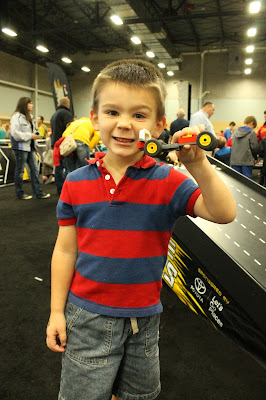
One of the first places LP wanted to go
was the Race Ramps! - Know where the Freebies are: There are a lot of activities and races you can do at the LEGO Creativity Tour and the best part is that they're all included with the price of your ticket! Make sure to go to the Community Build. After completing a fun build project, you'll receive a free mini Lego City kit and have a photo opportunity. And by the way, wherever there is a photo opportunity, the staff there will take your photo and give you a copy of it afterwards. Last night they were working through some glitches with their printers, so hopefully there won't be any for the the rest of the weekend.
If Lego kits are something you're interested in, then head to the LEGO Friends area next. They will give you a mini LEGO Friends kit and there is a photo opportunity there too. I also think there are mini LEGO kits at the Challenge Zone in the back of the show, but we didn't personally make it there. And I think the Brick Battle Zone gives LEGO kits too, but those races and activities seemed to be better suited for kids older than ours (ours are 4, 2 and 8 months). The next place you should stop by at some point in time is the LEGO Club. Your kids can sign up for a free LEGO magazine that will arrive every other month at your house and at the show you can receive a free magazine and a little LEGO man kit. Another fun photo opportunity is at the LEGO Super Heroes area, and finally, you can get a poster at the LEGO Bionicle location. So just be aware of some of the free souviners you can bring home, and of course they have souviners you can buy at their LEGO Store and Marketplace ;)
Here is an example of a photo opportunity
LP, MP and I had fun showing LEGO Iron Man
our Community Build projects
This isn't necessarily a freebie but at the
Construction Zone you can have your
creation displayed for all to see - Watch The LEGO Movie before you go: We have 100 miles to travel to Des Moines, so it was just about the perfect drive to fit in The LEGO Movie on our trip to the LEGO Creativity Tour. This is just a fun way to get in the mood for the show, and as soon as you enter the event you are greeted by characters from the movie such as Emmet, Lucy and Lord Business.

MP wanted to take her photo with Emmet
in the Model Museum location


So are you excited and ready for your visit this weekend! There are still tickets available for some sessions both today and tomorrow so you aren't too late to get in on the fun. What are you looking forward to? Remember to Comment for a Cause!